Steps to become a hacker
Hacking is an engaging field but it is surely not easy. To become a hacker one has to have an attitude and curiosity of learning and adapting new skills. You must have a deep knowledge of computer systems, programming languages, operating systems and the journey of learning goes on and on. Some people think that a hacker is always a criminal and do illegal activities but they are wrong. Actually many big companies hire hackers to protect their systems and information and are highly paid. We have prepared a list of 12 most important steps necessary to become a hacker, have a deeper look

1. Learn UNIX/LINUX

linux operating system
UNIX/LINUX is an open source operating system which provides better security to computer systems. It was first developed by AT&T in Bell labs and contributed a lot in the world of security. You should install LINUX freely available open source versions on your desktops as without learning UNIX/LINUX, it is not possible to become a hacker.


2. Code in C language 

c programming
C programming is the base of learning UNIX/LINUX as this operating system is coded in C programming which makes it the most powerful language as compared to other programming languages. C language was developed by Dennis Ritchie in late 1970’s. To become a hacker you should master C language.


3. Learn to code in more than one Programming Language

programming languages

It is important for a person in the hacking field to learn more than one programming. There are many programming languages to learn such as Python, JAVA, C++. Free eBooks, tutorials are easily available online.

4. Learn Networking Concepts

computer networking
Another important and essential step to become a hacker is to be good at networking concepts and understanding how the networks are created. You need to know the differences between different types of networks and must have a clear understanding of TCP/IP and UDP to exploit vulnerabilities (loop holes) in system.
Understanding what LAN, WAN, VPN, Firewall is also important.
You must have a clear understanding and use of network tools such as Wireshark, NMAP for packet analyzing, network scanning etc.


5. Learn More Than One Operating Systems 

operating system
It is essential for a hacker to learn more than one operating system. There are many other Operating systems apart from Windows, UNIX/LINUX etc. Every system has a loop hole, hacker needs it to exploit it.

6. Learn Cryptography

cryptography encryption
To become a successful hacker you need to master the art of cryptography. Encryption and Decryption are important skills in hacking. Encryption is widely done in several aspects of information system security in authentication, confidentiality and integrity of data. Information on a network is in encrypted form such as passwords. While hacking a system, these encrypted codes needs to be broken, which is called decryption.


7. Learn more and more about hacking

hacking or hackers
Go through various tutorials, eBooks written by experts in the field of hacking. In the field of hacking, learning is never ending because security changes every day with new updates in systems.


8. Experiment A Lot

experiment
After learning some concepts, sit and practice them. Setup your own lab for experimental purpose. You need a good computer system to start with as some tools may require powerful processor, RAM etc. Keep on Testing and learning until you breach a system.

9. Write Vulnerability (Loop hole program)

hacking vulnerability

Vulnerability is the weakness, loop hole or open door through which you enter the system. Look for vulnerabilities by scanning the system, network etc. Try to write your own and exploit the system.


10. Contribute To Open Source Security Projects

open source software
An open source computer security project helps you a lot in polishing and testing your hacking skills. It’s not a piece of cake to get it done. Some organizations such as MOZILLA, APACHE offer open source projects. Contribute and be a part of them even if your contribution is small, it will add a big value to your field.

11. Continue never ending Learning 

learning hacking
Learning is the key to success in the world of hacking. Continuous learning and practicing will make you the best hacker. Keep yourself updated about security changes and learn about new ways to exploit systems

12. Join Discussions and meet hackers 

discussion
Most important for a hacker is to make a community or join forums, discussions with other hackers worldwide, so that they can exchange and share their knowledge and work as a team. Join Facebook groups related to hacking where you can get more from experts.

Now a day’s PC usage is common and everyone uses memory cards, pen drives to transfer data from one computer to another computer. In the recent days flash drives usage is increased tremendously because it is easy to carry and at the same time you can take GB’s of data with these tiny devices. Coming to the point sometimes these pendrives and memory cards doesn’t allow to copy any data to pendrive and only allow to read the data which is stored in that device.
disk is write protectedWhen you are trying to copy something into that flash drive it shows a message like “The disk is write protected”. If it shows message like this you cannot perform any copy paste operations on that USB drive.

Possible Reasons for USB Write Protection:

There are so many reasons for USB write protection, some errors happened due to malware and virus attack, some errors occurred due to PC settings.
  • To prevent from virus PC users make USB drives and memory cards read only.
  • Malware and virus can change settings into read only and can’t be changed.
  • Memory cards have a small button which allows you to read the data only.

How to Remove Write Protection from Pendrive/Memory Cards?

Perform Low-Level Formatting:

By performing low level formatting you can get your pendrive or memory card into previous state. Users must pay attention when do this low level formatting. Because you will loss data which is stored in your pendrive.

Steps to Perform Low Level Formatting:

1. First you need to download one special tool for this operation because by using windows default format method this issue cannot be resolved.
2. Now format your memory card or pendrive using this low level formatting tool.
format using low level format tool
3. After that open run dialogue box by pressing Win+R key combination and type diskmgmt.msc in the box.
4. Now in the disk management system you can find your pen drive or memory card along with other hard disk partitions. Once format your flash drive and allocate space to that drive.
Now your pendrive doesn’t show a message “This disk is write protected” while copying files to pendrive.

Modify Registry settings:

If the above method doesn’t work for you then you can try this method. Before changing registry settings make sure to backup all registry settings. Because changing registry settings lead to system crash.

Steps to Remove Write Protection Using Registry Editor:

1. First you need to open run dialogue box by pressing Win+R key combination and type regedit in that box.
registry editor
2. Now it will open some sort of settings which are related to system settings in windows.
3. Now search for the following registry key through edit menu.
HKEY_LOCAL_MACHINE\SYSTEM\CurrentControlSet\Control\StorageDevicePolicies
remove write protection using registry editor
4. If the above key doesn’t exist in the registry editor then simply download the below batch file and just run it on your computer. It automatically adds to registry editor.
5. Now again search for that key and this time you’ll definitely find that key. In that go to write protect key and change the value from 1 to 0. Here 0 means off and 1 means ON.
change value from 1 to 0
Here we successfully turn off write protection to your pendrive/memory card using the default windows trick.

Remove Write Protection on Transcend Memory Card/Pendrive:

If you have transcend company memory card/pen drive then this method will work for you. By using the below tool you can remove write protection to any transcend memory card/pen drive.
1. First of all download Online Recovery Tool from the below website and run it on your windows computer.
2. Now connect your write protected transcend pendrive/memory card to PC.
3. Now select any one option from the available two options. If you want to remove data and write protection then choose first option. This option will remove whole data and write protection.
4. If you want to remove write protection only then choose second option, this one only remove write protection from the pendrive and keep your data safe.
5. After choosing desired option click on start button to complete the formatting process.
In this way you can remove write protection to any pendrive/memory card.


Host file is used to bypass the DNS and connect to the Internet based on the user defined rules. If you want to have your own set of rules and bypass the DNS then you need to edit the host file. Editing hosting file is little different from editing the normal file because, Editing the host file needs administrator privileges in operating system. Here in this post you learn how you can edit the host file easily in Windows and Linux.

Editing Host file in Windows 8 [Without Tool / Traditional way]

As to edit the Host file we need to run the text editor with Administrator privileges. You can use any text editor like notepad, notepad++,wordpad or any other your favorite text editor (Don’t forget to share with us) to edit the host all you need is just to run your text editor application with Administrator privileges. Running the applications with Administrator privileges on Windows 8 is so easy.There are multiple ways to run an application with administrator privileges, Here we have choose the best and easy way to run the applications.

1) Running the Text Editor with Administrator Privileges

Step 1: Search for the App/Program as shown in below image
run-as-admin
Step 2:- Now right click on the text editor, Here for this tutorial we are using Notepad to edit the host file so we selected it.You also just tap or click(left click) on the application by holding down the shift and ctrl key together.
Step 3: Now click on Run as Administrator as shown.If you are account does not have administrator privileges you need to enter the administrator password to complete the action.
That’s it now you have completed running your text editor with administrator privileges.

2) Editing the Host file

The host file in windows is located at location specified below
c:\windows\system32\drivers\etc\hosts
Navigate to the specified location and select the file to open as shown in below image.(Don’t forget to change the type of file from .txt to All files to show the host files.
host-file
That’s it now you are done. You can edit the host file and save the file.
If you don’t want to follow these steps then you can get host file editor from here. It has awesome and simple user interface with nice features. You will surely love this tool. If you frequently edit the host files.The only thing that hurts is it needs .NET framework!..Which making this unfit for running the this program easily on other computers.
I found a better alternative for this from the Wingix software (Running Ngnix on local server)  which can be run on any computer without any dependency on other programs.  You can get this file from here (Hosted on my DropBox account)

Editing host file in Linux

Editing the host file on Linux also needs the administrator privileges. And the host files are stored in /etc/hosts folder as same in Windows You can use any text editor to edit. Here we are using the gedit editor to edit the host file because I like the gedit editor.So here is the command for it.
sudo gedit /etc/hosts
for vi editor
sudo vi /etc/hosts
hosts on linux
If you are not having administrator privileges on your account then you are promoted to enter the password to continue.As shown in the image
host file
Here as I used gedit editor to edit the host file on my ubutnu computer.
I use Host files mainly for the forced DNS propagation, and blocking unwanted sites on my laptop.


Google play store is a platform to download many android apps. But to download the apps / .apk files you need a google account. So here is the trick to download android apps / .apk files from Google Play Store without login or without a google account. You can download android apps to you pc or mobile with this little tip. If you like our work, like us on facebook for more.

How To Download APK Files:
 1. First goto a page of any apps you want from Google Play.
 2. Copy the link (URL) of that page.


 3. Now goto - APK Downloader website.
 4. Then paste that link and click - Generate Download Link.


 5. Wait for few seconds and click on - Click Here To Download.


 6. Your file start Download. Enjoy The Site :)

XAMPP is the most popular PHP development environment

XAMPP is a completely free, easy to install Apache distribution containing MySQL, PHP, and Perl. The XAMPP open source package has been set up to be incredibly easy to install and to use
So Xampp is used to hack any E-mail or Social Media account using Phishing Attack on any windows or Linux machine
Instructions:
  1. First install Xampp on windows or linux. You can find Xampp on Download
  2. Open Xampp and click on Start Apache and Start mySQL
  3. Then open any browser and in the url form click " LocalHost "
  4. Then the main site of Xampp will be displayed on the browser
  5. Now we have to replace the Files of Xampp's Homepage with the Phishing Files ( Fake Facebook files ) 
  6. You will Find the Phishing files Here
  7. Download the Files from the above and Extract the RAR. Then you wil find 2 files namely " index.html " and " login.php "
  8. These are the Phishing files to hack facebook account. copy these 2 files 
  9. Open Xampp and click on " Explorer" . This will opens the files of Xampp's located on hard disk 
  10. Then open "htdocs" folder on it and delete all the files on it
  11. Then paste the Phishing files there
  12. That's all your ready to hack any Facebook account
  13. To verify open Browser and again click "localhost" on url tab then you will find a Fake Facebook Page is loaded
  14. If you want to hack any victim make him login by opening LocalHost on any browser on your machine
  15. The hacked passwords and username's are dumped on a file named "log_x.txt " below the Phishing files which are replaced on xampp's directory


* Autorun.inf
* new folder.exe
* Iexplorer.vbs
* Bha.vbs
* nfo.exe
* New_Folder.exe
* ravmon.exe
* RVHost.exe or any other files with extension.

Actually this viruses are hidden and can't be seen even after

you enable show hidden folders.

Following simple dos command will change the attributes of
these files ,there after you can remove it by pressing delete
key.

Follow these steps:

Step1.:Type cmd in Run
Step2.: Switch to the drive on which pen drive is connected
(like C:\> h: enter)
Step3.: type exactly as attrib -s -h *.* /s /d and hit enter
(don't forget spaces).

Now you can see hidden virus files and you can delete them.


                       Watch Live Tv On VLC Media Player With Slow Internet Connection


Missing your TV outside the Home here is the solution watch LIVE TV on LOW INTERNET SPEED. THOSE WHO HAVE SLOW INTERNET CONNECTIONS THEY CAN NOW WATCH & RECORD LIVE TV USING VLC Media Player.

Follow The Instructions -

1.Open VLC Player
2.Go to MEDIA Tab and select OPEN NETWORK STREAM
3.Then paste the MOBILE TV Links URL (rtsp) which are already posted on gstek
4.Then Click on Play Button
5.Then Click on Play Button On the player then streming starts


For Recording - Follow Instructions 1,2,3 Then -

*Instead On Play Click on the small icon on left side of play button
*select convert
*select destination and file name
*click start
*recording will start
*click on stop button to stop recording
*recorded file name will have extension of .ps and it will not be having any icon
*click on the file and open it with vlc player
*you can also rename the extension of file from .ps to .mp4


How To Install Android Operating System Perfectly For PC

Android-x86 has released the first iso image file of Android Jelly Bean on Christmas Eve available for download. The jb-x86 is based on Android 4.2.1 and this is the first Jelly Bean test release version, so it is possible to see a few bugs here and there. I have tested it on Asus laptop and so far everything seems to work reasonably well, including the WIFI connection. As we expected, Android jb-x86 runs smoother and responsive compared to the AndroVM Jelly Bean.
Here Are The Steps How To Run/Install Android ISO -

Install Android OS With CD/DVD -

1. Burn android_OS_-x86-4.2-20121225_WOC.iso Into A CD/DVD
2. Restart And Install Like Windows Installation.
3. You Are Done. Enjoy
Install Android OS With USB Device -

1. Download android_OS_-x86-4.2-20121225_WOC.iso - Links Are Bellow Of Post

2. Download LinuxLive USB Creator (LiLi) and install. - Links Are Bellow Of Post

3. Open LiLi USB Creator and follow the steps below:
STEP 1 : CHOOSE YOUR KEY - Select your flash drive.
STEP 2 : CHOOSE A SOURCE - Click on ISO / IMG / ZIP and pick android_OS_-x86-4.2-20121225_WOC.iso. LiLi will use Android x86 4.0 RC2 install parameters to create.
STEP 3 : PERSISTENCE - Just leave it default.
STEP 4 : OPTIONS - You may check or uncheck the boxes according to your preferences. These will not affect jb-x86 installation.
STEP 5 : CREATE - Click on the lightning icon to start the installation.


4. Once the installation is done, restart your computer.

5. Before loading BIOS, choose your flash drive to boot first. Usually by pressing ESC or F10 key, you may have to refer your computer's manual guide.

6. Try/Install Android Jelly Bean:
Select Live CD - Run Android-x86 without installation to try jb-x86 before your install it. (Strongly recommend you to try the OS first)
Select Installation - Install Android-x86 to harddisk if you wish to instal


Download Links -

DOWNLOAD ANDROID OS FOR PC FROM BELLOW
  Amon | Uploadbaz | Huge

                                  DOWNLOAD LINUXLIVE USB CREATOR FROM BELLOW


How To Fix Windows Was Unable To Complete The Format | Some Easy Steps    
 
 
Unable to format a SD Card or a PenDrive or any thing. Then use this simple steps and you can format and open your memory card, pendrive and every thing.
1st Method :
1. Go to desktop and right click on my computer.
2. Select Manage from the menu.
3. Then goto disk management from the options.
4. After that select the flash drive from the clicked window.
5. And then format your flash drive with the option you got from there.


2nd Method :
1. Login as an administrator powered user and go to "Command prompt".
2. Now type - format g: /q /fs:fat32 - and press Enter
If Your Flash Drive Letter G: . If not Then Just Change g: From There With Your Flash Drive Letter.
3. If you want to format your pendrive then just replace fat32 with ntfs.
Example : format g: /q /fs:ntfs
If Your Flash Drive Letter G: . If not Then Just Change g: From There With Your Flash Drive Letter.


3rd Method :
If Still It Didn't Format Then Use Some Format Software .......
1. SD Formatte
2. Any Drive Formatter


...............................................,,,,,,,,
:-) hi guys! !!!! it me again Raja Aakash 
with new software!!!!

4K Video Downloader allows to download video, audio and subtitles from YouTube in high-quality and as fast as your computer and connection will allow. If you want that video on your iPad, iPhone or other device we've got you covered. Downloading is simple and straightforward: just copy the video link from your browser and click 'Paste Url'. Done!


Developer: OpenMedia LLC

How To Use This Software:
 1. First Goto - Video Download Software - Folder
 2. Now Open - 4kvideodownloader.exe
 3. Then Copy a YouTube Video URL
 4. Now Click On Paste Url in Software.
 5. Chose Which Quality You Want To Download.
 6. Your 1080p HD YouTube Video Get Download. Enjoy This Soft.
 7. If You Want To Download All Videos in a Click From a YouTube Channel Or You Want To Download a Whole Playlist, Then You Need To Activate This Program.


Download 4K Video Downloader Free From Bellow:


bit.ly/1n6jpdE


Do you want to learn how to hack twitter?, 
Are you looking for a way to


hack your friends twitter account without them fiding out? Interested in
finding out ways to hack someones profile? Maybe you want to take a
quick peek at their direct message inbox, steal their username or find a
glitch to use a hacking script.In this article I will show you a fairly
easy step by step guide on how to hack twitter user accounts.


Instructions:
 Download,
Open,
Type twitter account email,
Press ” Crack the Password”
Done


                                                       click here for download 

What is a Hardware Keylogger and how Hardware Keylogger works.


Hey Hackers! in this post of Hackytime, Iam  going to tell you about Hardware Keylogger. You all might already know about what is a keylogger.
If you are new to the term keylogger, you may read more about What is a Keylogger and How keylogger Works Here.
Now we are going to tell you What is a Hardware Keylogger and How a Hardware keylogger works.
Here is what a Hardware Keylogger Looks like.
What is a Hardware Keylogger | How hardware keylogger works
Hardware keylogger 
A Hardware Keylogger is nothing but a programmed chip (Mostly in assembly Language), so as to capture all the keystrokes and save them in its internal memory. The keylogger can then be taken out and all the stored information can easily be assessed by the hacker. Hardware Keylogger are most commonly used in cyber cafe’s and other public places where a lot of people come and access the internet. Beware of such places.
Always check the keyboard connectors before accessing internet at such places. Hardware Keylogger are extremely powerful and effective and if they are actually installed on any machine and you use it, there is 99.9% chance of you getting hacked.
How can it affect you. Imagine you going to a cyber cafe and make a bank transaction just to pay your bills. No sooner you enter your login detail, the hardware keylogger will save the keystrokes. Some advance hardware keyloggers might also take screenshots at regular interval so that the hacker knows the login details are for which website or webpage.
Once the hacker has all this information in the Hardware Keylogger, imaging what all can he do when he access that information. And this is just a small example. There is much more damage one can do with a hardware keylogger.
Prevention: To secure yourself from such attack, there is only one way. Check the hardware of the computer you use at public places and even your personal computer if your friends come to your place often. Who knows who might attach the hardware keylogger in your machine.
Now that you know What is a hardware keylogger and How Hardware Keylogger works, share this information with your friends and protect them from getting hacked by the black hat hackers now.

#HAckytime

How to Hide you IP Address | Change IP Address


After a lot of requests from various hackers across the world, we are coming up with this post on Hackytime. This post will tell you How to Hide Your IP Address or How to Change your IP Address
Read this if y0u want to know What is Ip Address
Changing or Hiding the IP address is one of the biggest concerns of all Hackers as the IP Address can reveal the identity if the Hacker. Its just like your online address. If anyone can find your actual online address (IP Address), tracing you back won’t be that difficult.
Thus it is very important to hide or change your IP address before doing any kind of hacking attack or even think of doing so.
After getting hundreds of request on a tutorial on how to hide your IP address, here I am writing a detailed step by step tutorial on how to hide or change ip address.
We are using the proxy service called Hide my Ass (pro VPN).
What’s that? Let me explain in detail.
We all know about proxy servers. They help us to hide your ip address or change ip address but there are many things you guys don’t know.
1) Free proxies are not completely anonymous – Your up can be disclosed by the website owner to the concerned authorities if needed.
2) Companies limit the maximum speed of browsing in free proxies – Say your internet speed is 8 Mbps, still using free proxies you can browse internet with a speed of only 265 kbps. This is irritating, isn’t it.
3) Many Webmasters can block users accessing free proxies.
There are different type of proxies. .
Even I wanted a reliable and Elite Proxy which can help me completely hide my Online Identity and what else could be better than changing my IP address every minute. I looked for many solutions online and then I found the PRO VPN of Hide My Ass.
To be very honest, in the beginning I was a bit confused when I saw the software. I was not very sure if it would work the way I wanted to but then I gave it a try. I thought of jiving it a try just for 1 month. It was just for $11.52 then , not it costs $9.99 only. I could actually think of spending $11.52 for my only if it gave me the kind on anonymity I wanted on internet. It helped me secure my online Identity online.
Here are benefits I got after using the PRO VPN of Hide My Ass.
  1. Super fast, high speed elite / anonymous proxies. Elite proxies are 100 times more secure than free proxies
  2. I could select the country whose IP address I wanted in just 1 click. It offers over 38000+ unique IP Address from 53 different countries.
  3. I can set the timer to automatically change the IP Address. This way my IP Address gets changed every minute without me bothering to do so. If I am implementing a hacking attack, no-one could actually find my actual IP Address so I am always on the safer side.
  4. It anonymously encrypts all the traffic and works with all kind of platforms. Unlike free proxies the PRO VPN of Hide My Ass is not blocked by the websites. The traffic seems to be of legitimate human users, not proxies so on one can catch you using them.
I am giving away some screenshots for you guys so that you can have a look at what the software looks like.
Here is what the homescreen of the VPN looks like: 
Home Screen Of Hide My Ass Pro VPN | Hide IP Address | Change IP Address

Once you enter the Software Dashboard, you get the interface shown.
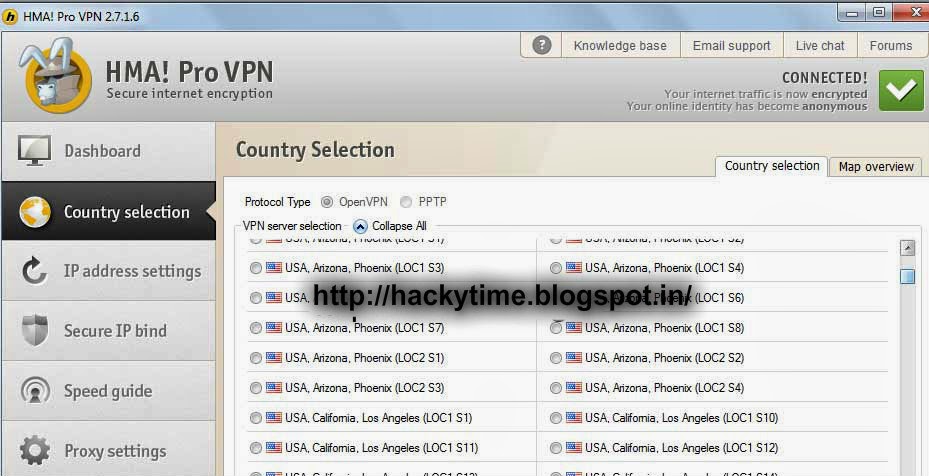
We can select the IP Address of the country we want. There are 53+ countries and 38,000+ IP Address to chose from. Here is what the interface looks like.

We also get the provision to set the IP timeout ie we can select the time after which each IP Address should change and we get a new IP Address. It is a simple one click setting. Here is what the Set IP Timeout feature of Hide My Ass Pro VPN Looks like.vHiding / Changing your IP Address automatically was never so simple.
Finally last but not the least here I am showing how the changed IP Address 
Now that you guys have everything infront you you, you can imaging how easy it is to change the IP Address automatically using the Hide My Ass Pro VPN. This surely is the best proxy service out there. I was so overwhelmed by its response that I decided to write a detailed review about its performance.
If you are still in doubt just go and give it a try. It surely is worth it. I am sure you can spend $9.99 for your online security. It can actually have you from $$$$ loss and at the same time secure your online identity by making you anonymous.
There are many other benefits of using this service. This post has already become too long so will not stretch it more, maybe I will soon write another blog post for you guys describing how this Best Proxy Service can help you from getting hacked and increase your online security by continuously changing your IP Address.


Give it a try and share your views. Waiting for your feedback!